Qovelyra
Loom Capsule
Loom Capsule
Couldn't load pickup availability
1. The Idea Thread
Many learners begin with a visual idea but struggle to keep that idea consistent across several design attempts. A concept may start with a clear mood, yet the final images can drift away from the original direction. Without a planning method, small choices around color, framing, texture, and subject detail may feel random. This often makes it harder to understand why one version feels stronger than another. Loom Capsule responds to this challenge by giving learners a structured way to weave ideas into a clearer visual study.
2. A Compact Creative Workflow
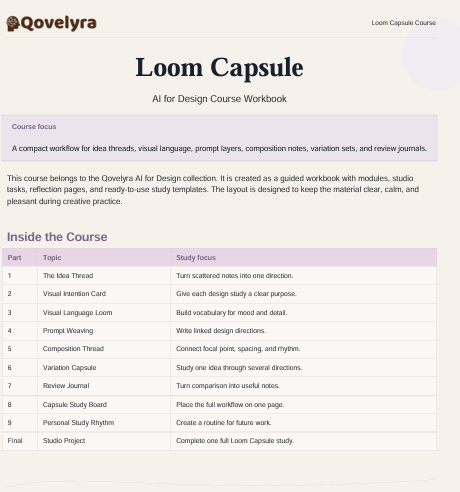
Loom Capsule introduces a focused workflow for turning early design thoughts into organized visual directions. The course guides learners through concept notes, prompt structure, mood language, and review criteria. Each stage is presented as a practical step, so learners can study how one creative decision affects the next. Instead of treating AI-supported design as a single command-and-result activity, the course frames it as an iterative studio process. Learners leave with a clearer method for planning, testing, reviewing, and refining visual work.
3. What’s Inside
The course begins with a module on visual intention. Learners define a subject, atmosphere, audience context, visual tone, and compositional direction before writing any prompt. A worksheet called the “Idea Thread” organizes these notes into a clear creative brief.
The next module studies language for visual control. Learners explore how wording can influence perspective, lighting, color balance, surface detail, material feel, and scene arrangement. Examples show how small changes in phrasing can shift the mood or structure of a visual concept.
A section on composition introduces focal points, negative space, rhythm, contrast, and visual hierarchy. Learners review sample outputs and identify how different compositions guide the viewer’s eye. This is followed by a prompt variation module where learners create multiple directions from one base idea.
The course also includes a review journal template. This template invites learners to document what changed, what stayed aligned with the brief, and what needs further adjustment. A final creative exercise brings the modules together through a small design study: choose a theme, write a brief, create prompt variations, compare results, and record design notes.
4. Who Is This For?
Loom Capsule is intended for learners who already understand the basic idea of AI-supported design and want more structure. It suits visual thinkers, students, early-stage designers, content creators, and creative hobbyists who want a guided way to organize design experiments.
5. What You’ll Learn
- How to shape a clear visual intention before creating materials
- How to write more focused design prompts
- How to guide mood, lighting, color, and composition through language
- How to compare variations from one creative idea
- How to use a review journal for design decisions
- How to build a compact workflow for repeated creative practice
6. 30-Day Refund Terms
Refund requests may be submitted within 30 calendar days of purchase, subject to the store’s published refund conditions. The request should include the order details needed for review. Refund timing may vary depending on the original payment method and payment provider. This section should be used only when it matches the active Qovelyra refund policy.
Self-paced learning overview
- 📁 Digital file available after purchase
- ♾️ Long-term availability
- 🔒 Secure checkout
- 🗓️ Content updated in 2026
How are the courses structured?
How are the courses structured?
Each tariff follows a clear sequence of modules, guided explanations, visual examples, and practice tasks. Learners can move through the materials in order and revisit earlier topics when they wish.
Who are the courses intended for?
Who are the courses intended for?
The course collection is intended for curious beginners, developing designers, and creative learners who want to explore AI-supported design methods. No prior technical background is required unless a course page states otherwise.
What will I receive after enrollment?
What will I receive after enrollment?
You will receive the lessons, modules, worksheets, prompts, and supporting materials listed on the selected course page. The contents vary by tariff, so each description outlines the exact learning scope.
Share